
Invite Members
This page explains how an admin invites members to the organization. EM-OS does not send invitation emails; instead, you issue an invitation link and send it to the member yourself.
Issue an invitation link
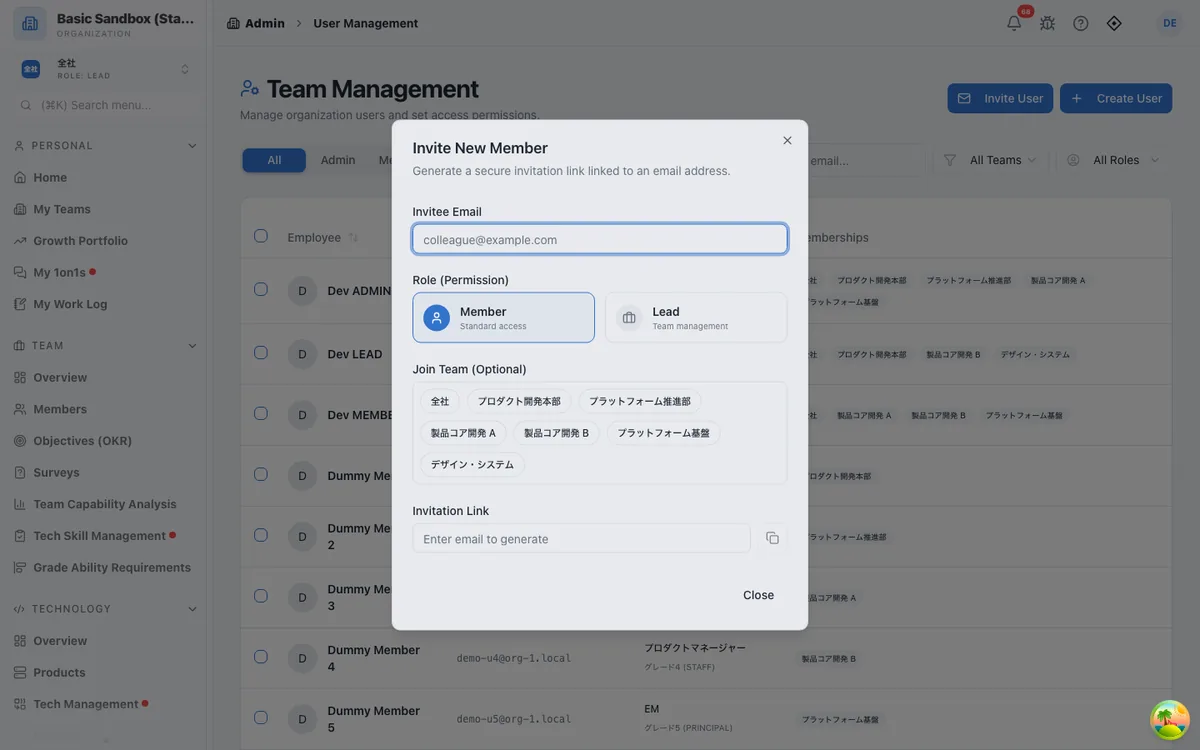
- Open Admin > User Management and select "Invite User" in the top right.
- In "Invitee Email", enter the email address the member uses to sign in to GitHub or Google.
- In "Role (Permission)", choose Member (regular access) or Lead (manages teams).
- If needed, choose teams in "Join Team (Optional)".
- Copy the link generated in "Invitation Link" and send it to the member via Slack or email.
WARNING
Invitation links expire after 24 hours. If a link expires, issue a new one using the same steps.
What the member does
The member opens the invitation link and selects "Continue with GitHub" or "Continue with Google" using the account with the invited email address. They then join the organization and complete the initial setup described in the Start Guide.
If the member is already signed in, they open the invitation link and select "Join with this account". If they are signed in with a different account than the one invited, they are asked to sign out and sign in again with the invited account.
When an invitation does not work
| Symptom | Cause and fix |
|---|---|
| "Email Mismatch" is shown | The invited email address differs from the email address of the account used to sign in. Sign in with the correct account, or invite the correct email address. |
| "Invalid Invitation" is shown | More than 24 hours have passed since the link was issued. Issue a new link. |
| "Limit Reached" is shown | The organization has reached its plan's user limit. Archive members who no longer need access, or change the plan. |
| A former member cannot rejoin | Archived members cannot rejoin unless they are invited again. Issue a new invitation link. |
Register an account in advance
Instead of an invitation link, you can create the account first with "Create User" in Admin > User Management by entering a name and email address. This method has no expiry. When the person signs in for the first time with a GitHub or Google account that uses that email address, they start out already in the organization.
Joining without an invitation
Anyone who signs in with an email address on the domain registered in the organization settings, once its ownership is verified through DNS, can join through onboarding without an invitation. People who join this way become members (to make one an admin, change the role in Admin > User Management after they join). People who already belong to another organization cannot join this way, nor can anyone join an organization that has reached the user limit of its plan. To set the domain, see the Admin Setup Guide.